Screenshot MCP Server for Claude: Capture, Compare, Prove
Give Claude scheduled screenshots, visual diffs, and a certificate of capture that anyone can verify.
TL;DR
Captureze now has an MCP server. Claude can screenshot any page for you, keep watching it on a schedule, tell you what changed, and issue a certificate that proves what the page said and when.
Add Captureze to Claude and sign in with your Captureze account. Nothing to install and no key to paste.
Then ask: “Capture https://example.com and show me what it looks like.”
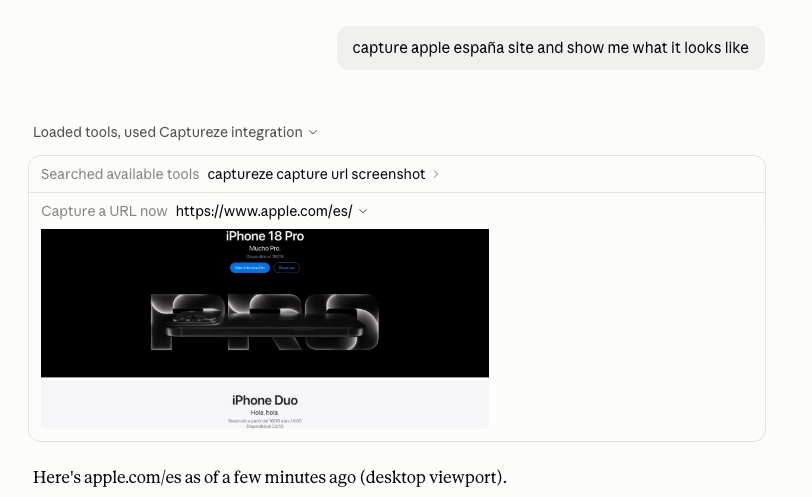
Using a client that isn’t Claude, or want it running on your own machine? Skip to Connect it. Everything below is the long version: what to ask for, what people use it for, how to connect it, and how it works underneath.
Your agent can already take a screenshot
There is no shortage of MCP servers that will hand an agent a PNG. If the question is what does this page look like right now, most of them answer it.
They stop at the questions that need memory or proof:
- What changed on this page since last Tuesday, and by how much?
- Has this pricing page moved at all since we started watching it, or am I imagining it?
- Can I hand this capture to opposing counsel and survive “how do we know it wasn’t edited afterwards”?
- What does our checkout look like from Germany, with the consent wall in the way?
Answering those needs a capture that is filed, kept, diffed and signed. That is a monitoring product with a memory, not a browser in a box, and that is what the Captureze MCP server is, which puts Captureze’s scheduling, visual diffs, proxy pool and Certificates of Capture behind tools an agent can call.
(And an agent that skips the screenshot entirely and reads the HTML has a worse problem: on a modern site the markup that comes back is frequently a bot-protection interstitial, a consent wall, an empty JavaScript shell, or another country’s storefront, and the model reports it as fact.)
Three things to ask Claude on day one
The server ships prompts for the workflows people actually run, so you don’t have to phrase them well:
watch-page. “Watch our status page every morning at 9.” The agent translates the cadence into a cron expression, checks your plan allows that interval, creates the site, takes a first capture and shows you what the page looks like right now.
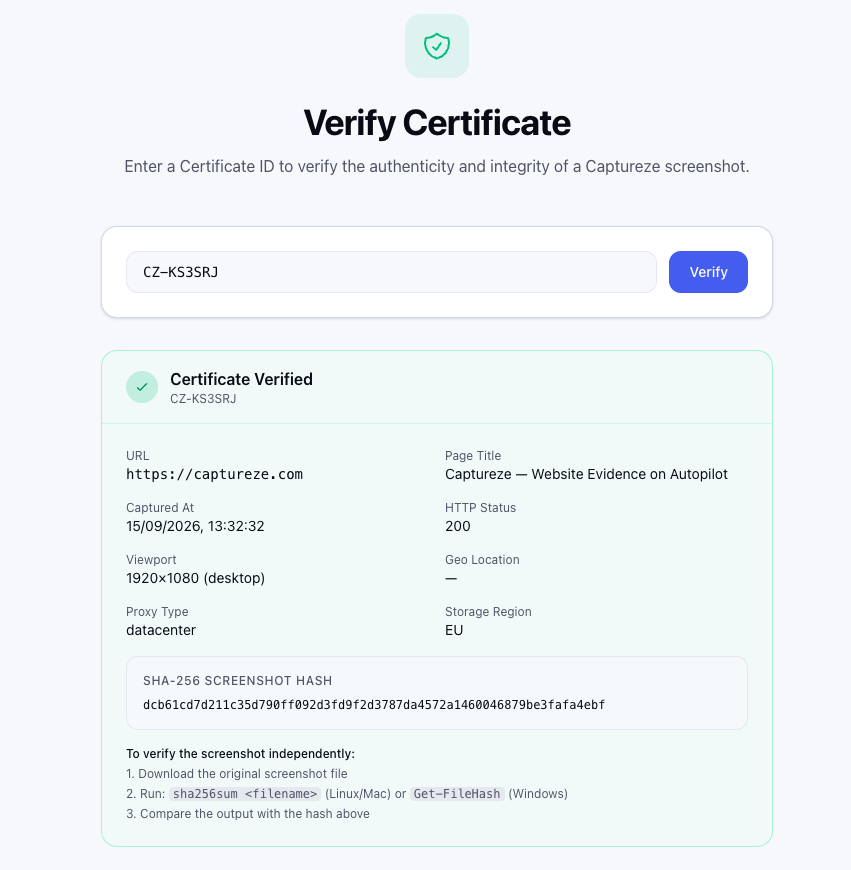
evidence-pack. “Put this competitor’s claim on the record, captured from Germany.” You get the screenshot plus the Certificate of Capture: SHA-256 of the image, UTC timestamp, where in the world it was captured from, and a public verification URL anyone can check without a Captureze account.
consent-audit. “Audit this site’s cookie banner as seen from the EU.” The agent detects the consent management platform, reports the accept and reject selectors it found, captures the page, and tells you whether rejecting is as easy as accepting, which is the question the Omnibus Directive actually asks.
What teams use Captureze MCP for
Three patterns it was built around:
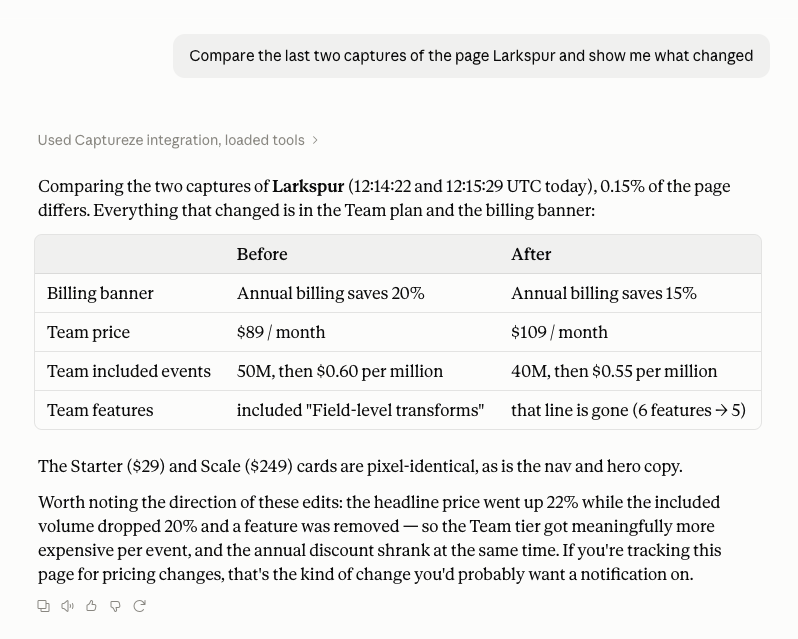
Competitive and regulatory watch. “Track these six competitor pricing pages daily and tell me the moment one of them moves.” The agent sets up the sites, and the diff percentage, not a wall of HTML, is what it reasons over.
Evidence, gathered conversationally. A claim on a website matters to a case, a dispute or a takedown. Ask for it, get the capture and the certificate, hand the verification URL to the other side. What a capture has to carry to survive a challenge is its own subject, covered in the guide to capturing legally admissible website evidence. The careful manual capture, the hash, the contemporaneous memo: that whole routine collapses into a sentence.
Consent and compliance sweeps. Point an agent at a portfolio of sites and have it report which ones make rejecting cookies harder than accepting them, with a screenshot from the right jurisdiction attached to each finding. (Consent detection is rate-limited to 20 detections per day per account.)
Connect it to Claude, ChatGPT or your own agent
Two ways in. The one-click connector signs you in with your Captureze account and needs no key at all. Every other client wants an API key, and you create one at Settings → API keys in the Captureze console: make a key, copy the cap_... value it shows you once, and use it wherever cap_xxx appears below. Keys need the Pro plan or an active 7-day trial, which unlocks every Pro feature and takes no card.
Claude Code:
claude mcp add captureze --env CAPTUREZE_API_KEY=cap_xxx -- npx -y @captureze/mcpClaude Desktop, OpenClaw, and any other stdio client:
{
  "mcpServers": {
    "captureze": {
      "command": "npx",
      "args": ["-y", "@captureze/mcp"],
      "env": { "CAPTUREZE_API_KEY": "cap_xxx" }
    }
  }
}
Remote clients talk only to a URL, so we run one for them:
https://mcp.captureze.com/mcpChatGPT: Settings → Apps → Advanced settings → Developer mode, then add a custom connector with that URL and your key as an Authorization: Bearer cap_... header.
claude.ai and Claude Desktop: add Captureze as a connector. That link opens Claude’s Add custom connector dialog with the name and URL already in place, and you confirm. (Pasting the URL by hand under Settings → Connectors does the same thing.) Either way the endpoint speaks OAuth 2.1, so you sign in with the same Captureze account you use on the site: nothing to copy, no API key involved. Claude Code’s remote transport works against the same URL if you would rather hand it a key:
claude mcp add -s user --transport http captureze https://mcp.captureze.com/mcp \
  --header "Authorization: Bearer cap_xxx"
Agent frameworks (OpenAI Agents SDK, Claude Agent SDK, LangGraph, Mastra, PydanticAI) take the server config directly through their MCP client layer. Per-client setup, including the ChatGPT developer-mode walkthrough, is in docs/INTEGRATIONS.md.
The OAuth path needs none of this: you sign in as yourself.
Under the hood: tools, limits and failure modes
What the server is, what it exposes, and how it behaves when an agent pushes on it.
What the server is
@captureze/mcp is on npm, MIT-licensed, Node 20+, source on GitHub. One command:
CAPTUREZE_API_KEY=cap_xxx npx -y @captureze/mcpThat’s a Model Context Protocol server exposing 18 tools, 2 resources and 3 prompts over the same account, plan limits and capture pipeline as the Captureze app and REST API. Anything the agent does through it shows up in your dashboard, and anything you set up in the dashboard is visible to the agent.
Two transports ship in the same binary:
- stdio. The client starts the process and the key comes from the environment. This is the one for agents running on your machine.
- Streamable HTTP (
POST /mcp). The client calls a URL and authenticates per request, either with its ownAuthorization: Bearer cap_...key or through OAuth 2.1. This is the one for hosted clients, and you don’t have to run it: it is live athttps://mcp.captureze.com/mcp.
What the agent can actually do
The tool surface is grouped around the jobs an agent is asked to do, not around REST endpoints:
| Job | Tools |
|---|---|
| See a page | captureze_capture_url, captureze_capture_site, captureze_get_capture_image |
| Watch it over time | captureze_monitor_site, captureze_list_sites, captureze_get_site, captureze_update_site, captureze_delete_site, captureze_list_captures, captureze_list_capture_runs |
| Measure what changed | captureze_compare_captures, captureze_diff_trend |
| Prove it happened | captureze_get_capture_certificate |
| Audit consent | captureze_detect_consent_banner, captureze_get_consent_detection |
| Stay inside the plan | captureze_account_status |
Plus search and fetch, the two tools ChatGPT’s deep research mode requires, backed by the same account data.
captureze_capture_url is the one that changes how a conversation feels. The agent gets back the screenshot as an image block, which a vision-capable model looks at, along with how much the page changed since the last capture of the same URL. “Check whether their pricing page moved” stops being a research task and becomes one tool call with a picture attached.
Every capture goes out through Captureze’s proxy pool, datacenter first and residential on escalation, so bot-protected and geo-restricted pages come back as pages rather than as 403s. You can pin the capture to a country (city-level targeting is a Business-plan feature), which is what makes “show me what our checkout looks like from Germany” a question an agent can answer at all.
Why MCP instead of calling the REST API?
If you are writing code, call the REST API. A script, a cron job or a backend service has no model in the loop, and MCP only puts a hop between you and the same endpoints. The API reference is where to start for that.
MCP is for when the caller is a model in a conversation rather than code you wrote. Four things change:
The model works out what to do. You do not write an integration per client. The agent reads the tool descriptions, works out that “check whether their pricing page moved” means listing captures and diffing two of them, and does it.
One integration covers every client. The same server answers Claude Code, Claude Desktop, claude.ai, ChatGPT developer mode and anything built on the MCP SDKs. Against the REST API you write and maintain that glue once per framework.
The screenshot comes back as something the model can look at. The REST API hands you a URL. The MCP tool returns an image content block, so a vision-capable model sees the page instead of reasoning about a link to it.
Failure arrives as an instruction. A plan limit or a missing key comes back as what to do next rather than as a status code the agent will retry blindly.
Built for agents, not bolted onto an API
A thin wrapper over a REST API makes a bad MCP server. Agents fail in specific ways, and most of the design work went into the failure modes.
Captures are filed where history lives. In Captureze, a capture belongs to a site, and that is what gives it a timeline, diffs and certificates. So an ad-hoc captureze_capture_url files its capture under a site for that URL: the existing one if the account already has it, a new one otherwise. That new site is created paused. It captures on request and never on its own, unless the agent explicitly asks for monitoring. An agent exploring your competitors at 2am cannot leave you with forty new cron jobs.
Errors are instructions, not stack traces. A 402 comes back as “this account’s plan does not cover the request; report the limit to the user and do not retry.” A 401 says the key is missing or invalid and names the variable to set. A 429 says to wait, and not to retry in a tight loop. Agents retry blindly by default; the error text is written to stop that.
Slow work is declared as slow. A real browser capture takes 10–60 seconds. The tool descriptions say so, which keeps agents from firing the same capture three times because the first one “hung.”
Big images don’t blow up the context. Above ~4.5 MB the tool returns a URL instead of inlining the image. Models without vision can pass include_image: false and work from the change percentage and the image URL instead.
Destructive means destructive. captureze_delete_site is annotated as destructive in the protocol, so clients that gate destructive tools behind a confirmation will gate it.
One endpoint, whole team, nothing to deploy
The HTTP transport is stateless and multi-tenant by design: each request carries its own bearer token, a fresh server instance handles it, and nothing about one caller survives into the next. That is exactly what makes it safe for us to run one instance for everybody, which we now do at https://mcp.captureze.com/mcp. Point your client at it and send your own key: a team shares the URL and nothing else, because usage, quota and sites all follow the key.
If you run a self-hosted Captureze install, or want the endpoint inside your own network, self-hosting is unchanged and still supported. The image is published to GHCR and the operating rules are in docs/INTEGRATIONS.md.
The CLI you’ll want when something’s wrong
The same tools are reachable by hand, which is the fastest way to tell “the agent asked for the wrong thing” apart from “the API misbehaved”:
captureze-mcp sites                     # what the account monitors
captureze-mcp capture https://example.com --full-page --out shot.png
captureze-mcp captures <site-id>        # history with change percentages
captureze-mcp account                   # plan, entitlements, usage
Output is JSON on stdout. With no command, the same binary starts the MCP server, so your existing client configs are unaffected.
How it compares to a plain screenshot MCP server
Compared in September 2026 against the documented capabilities of the best-known server in each category. A dash means the capability is not documented there, not that it is impossible.
| Browser-automation MCP | Screenshot-API MCP | Change-monitoring MCP | Captureze | |
|---|---|---|---|---|
| Screenshot a page on demand | ✓ | ✓ | via a monitor | ✓ |
| Captures kept as history for that page | — | — | ✓ | ✓ |
| Scheduled monitoring | — | — | ✓ | ✓ |
| Visual diff between two captures | — | — | ✓ | ✓ |
| Capture from a chosen country | — | — | ✓ | ✓ (Pro) |
| Residential IPs on escalation | — | — | ✓ (business plans) | ✓ |
| SHA-256 + public verification URL per capture | — | — | — | ✓ |
| Cookie banner / CMP detection with selectors | — | — | — | ✓ |
| Hosted endpoint you can add as a connector | self-host | ✓ | ✓ | ✓ |
The two rows nothing else ticks are the point. Every Captureze capture carries a Certificate of Capture: a SHA-256 hash of the image, a UTC timestamp, the country it was captured from, and a verification URL anyone can check without an account. And no other MCP server we found exposes consent-banner detection with the accept and reject selectors it discovered.
Everything above those two rows is table stakes, and several products cover it. A capture you can put in front of someone who will dispute it, and a straight answer to whether a site makes rejecting cookies harder than accepting, are what Captureze was built for.
Get started
- Add the connector to Claude and sign in. That is the whole of it. For a client that wants a key instead, create one at Settings → API keys in the console; keys need the Pro plan or an active 7-day trial, which unlocks every Pro feature and takes no card.
claude mcp add captureze --env CAPTUREZE_API_KEY=cap_xxx -- npx -y @captureze/mcp- Ask your agent: “Capture https://example.com and show me what it looks like.”
The server is open source under MIT at github.com/Captureze/mcp, and issues and pull requests are welcome. If there’s a client you want connected or a tool you want exposed, that’s the place to say so.
Frequently Asked Questions
What is MCP (Model Context Protocol)?
MCP is an open protocol that lets an AI client discover and call tools exposed by an external server. Instead of writing a custom integration for every model or agent framework, a service ships one MCP server and any MCP-capable client can use it: Claude Code, Claude Desktop, claude.ai, ChatGPT developer mode, OpenClaw, or an agent built on the MCP SDKs. The Captureze MCP server exposes screenshots, monitoring, visual diffs, capture certificates and consent detection as tools an agent can call.
Which AI clients can connect to the Captureze MCP server?
Any MCP client. The server ships two transports: stdio for clients that start the process locally (Claude Code, Claude Desktop, OpenClaw and most desktop agents), and streamable HTTP for hosted clients that call a URL. We run that one at https://mcp.captureze.com/mcp. It accepts either way of proving who you are: an Authorization: Bearer cap_... API key for clients that can set a header (ChatGPT developer mode, Claude Code's remote transport, server-side agents), and OAuth 2.1 for clients whose connector dialog has no header field, which is how the claude.ai custom connector signs in, with no key to paste. Frameworks with built-in MCP support (OpenAI Agents SDK, Claude Agent SDK, LangGraph, Mastra, PydanticAI) take the server config directly.
Do I need a paid Captureze plan to use the MCP server?
The MCP server itself is free and MIT-licensed; how you connect decides what you need. Connecting through OAuth, which is what the claude.ai connector does, signs you in with your ordinary Captureze account, so no API key is involved at all. Connecting with a header needs an API key, which you create in the Captureze console under Settings, on the API keys tab. API keys are a Pro-plan feature; the 7-day trial runs at Pro feature level with no card required, so a trial account can issue one from day one. Either way the agent's calls are metered against your plan exactly as they are in the app, including capture quotas, the minimum schedule interval and geo-targeting, and an account with no active plan gets a clean upgrade message rather than a silent failure. Certificates issued during a trial carry an EVALUATION watermark, though the SHA-256 hash and metadata are authentic either way.
Can the agent start monitoring or delete sites without me noticing?
Ad-hoc captures never start a schedule on their own. When an agent captures a URL the account has never seen, the site behind it is created paused, so it captures on request and never on its own, unless the agent explicitly passes monitor: true. Destructive tools are annotated as destructive in the protocol, so MCP clients that ask for confirmation will ask before a site is deleted.
Do I have to deploy anything to use the HTTP transport?
No. We run it at https://mcp.captureze.com/mcp. Point a remote client there and authenticate each request with your own Authorization: Bearer cap_... key. The transport is stateless and multi-tenant, so one endpoint serves everyone: a fresh server instance handles each request and nothing from one caller survives into the next. Self-hosting is still supported and is the right answer for a self-hosted Captureze install or an endpoint inside your own network. If you do self-host, terminate TLS in front of it, set CAPTUREZE_MCP_ALLOWED_HOSTS to the public hostname, and do not set CAPTUREZE_API_KEY on a shared deployment, because that key would become the fallback identity for every unauthenticated request.
How is this different from a plain screenshot MCP server?
A plain screenshot server takes a picture on demand and forgets it, which is a different job. Captureze stores every capture against a site, so the agent can ask what changed since the last one, compare any two captures pixel by pixel, and see how much a page has moved over months. It also issues a Certificate of Capture (SHA-256, UTC timestamp, capture origin and a public verification URL) for captures that have to work as evidence, routes every capture through a datacenter and residential proxy pool with country targeting, and can detect a site's cookie banner and its accept and reject selectors.
Why not just let the agent fetch the page HTML?
Because HTML is not what a person sees. Bot protection returns an interstitial, geo-routing returns a different country's page, consent walls cover the content, and client-rendered pages return an empty shell. Even when the markup arrives intact, it does not tell you that a cookie banner is covering the price or that the layout broke on mobile. A screenshot answers the question the user actually asked.
Related Guides
Capture Website Evidence With Captureze
Automated scheduled screenshots with SHA-256 hashes and downloadable Certificates of Capture. No credit card required.